Windows Explorer, A Security Vulnerability in Windows 7 RC


Now that Microsoft has been kind enough to roll out Windows 7 Release Candidate (RC) and make it available for download to the general public (this is the last free version of Windows 7, so get it while it’s hot, because Windows 7 RTM will not come free of charge), let’s take a look at Windows Explorer and see if it is safer in this version of the Windows-based operating system.
“In Windows NT, 2000, XP and Vista, Explorer used to hide extensions for known file types. And virus writers used this "feature" to make people mistake executables for stuff such as document files. The trick was to rename VIRUS.EXE to VIRUS.TXT.EXE or VIRUS.JPG.EXE, and Windows would hide the .EXE part of the filename. Additionally, virus writers would change the icon inside the executable to look like the icon of a text file or an image, and everybody would be fooled,” explains F-Secure, company that specializes in providing security software solutions.
According to F-Secure, nothing has changed in Windows 7 RC, in regard to how Windows Explorer displays files. As you can see from the images below (courtesy of F-Secure, of course), the file “horrible_malware.txt.exe” is displayed as a .txt file (that’s Notepad for the less technically oriented).
On the upside, Windows 7 RC comes with one security setting that should prevent the spread of malware such as the Conficker worm . The setting I am talking about is related to how AutoRun is enabled by default in AutoPlay. A detailed article on the subject is available here, but if you don’t want to read it, here is what’s changed: AutoPlay will launch when you insert a CD/DVD, but not when you plug in an USB device. This change has been implemented in Windows 7 RC and will be a feature in the upcoming Windows 7 RTM; its implementation was needed in order to address the need to stop malware that was abusing AutoRun to propagate.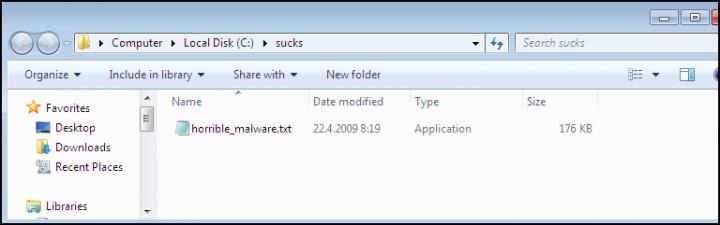
“In Windows NT, 2000, XP and Vista, Explorer used to hide extensions for known file types. And virus writers used this "feature" to make people mistake executables for stuff such as document files. The trick was to rename VIRUS.EXE to VIRUS.TXT.EXE or VIRUS.JPG.EXE, and Windows would hide the .EXE part of the filename. Additionally, virus writers would change the icon inside the executable to look like the icon of a text file or an image, and everybody would be fooled,” explains F-Secure, company that specializes in providing security software solutions.
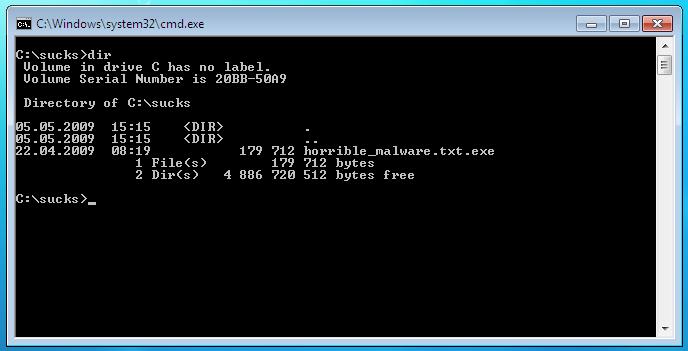
According to F-Secure, nothing has changed in Windows 7 RC, in regard to how Windows Explorer displays files. As you can see from the images below (courtesy of F-Secure, of course), the file “horrible_malware.txt.exe” is displayed as a .txt file (that’s Notepad for the less technically oriented).
On the upside, Windows 7 RC comes with one security setting that should prevent the spread of malware such as the Conficker worm . The setting I am talking about is related to how AutoRun is enabled by default in AutoPlay. A detailed article on the subject is available here, but if you don’t want to read it, here is what’s changed: AutoPlay will launch when you insert a CD/DVD, but not when you plug in an USB device. This change has been implemented in Windows 7 RC and will be a feature in the upcoming Windows 7 RTM; its implementation was needed in order to address the need to stop malware that was abusing AutoRun to propagate.







