Windows 7: Latest Winamp Version Can Be Controlled from the Taskbar


I started my favorite music player Winamp the other day and immediately I was prompted to get the latest update, mainly Winamp 5.60 (5.601 to be more precise). Seeing the update comes with “security fixes” I said okay Nullsoft, I will get the latest Winamp version because I know that keeping applications up-to-date is one of the things computer users must do to keep their systems safe and secure – the other things you must do include keeping the operating system up-to-date as well as using an antivirus application (use Microsoft Security Essentials if you want an antivirus application that doesn’t cost a thing).
There was one little thing that caught my eye in the update prompt. It said the latest Winamp version is Windows 7 compliant, that the latest Winamp version supports the latest iteration of the Microsoft-developed Windows operating system. I knew my current Winamp version worked on Windows 7, so it didn’t bother my head too much with that.
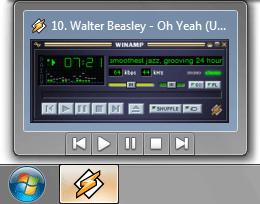
What I did bother myself with was the next part advertised by Nullsoft – Winamp provides support for taskbar player controls. Know how when you hover the mouse over a button in the taskbar, you get an Aero preview, a small window that displays a preview of the application or open document in the taskbar? Well, now you can control Winamp from that preview.
The Aero preview of Winamp displays a play, pause, stop, previous and next track button. Check out the image below to get a better picture of what I am talking about.
What other new bits and pieces does the 5.6 version of Winamp has to offer? Here’s a list:
If you would like to get Winamp, you can download the application here.
There was one little thing that caught my eye in the update prompt. It said the latest Winamp version is Windows 7 compliant, that the latest Winamp version supports the latest iteration of the Microsoft-developed Windows operating system. I knew my current Winamp version worked on Windows 7, so it didn’t bother my head too much with that.
What I did bother myself with was the next part advertised by Nullsoft – Winamp provides support for taskbar player controls. Know how when you hover the mouse over a button in the taskbar, you get an Aero preview, a small window that displays a preview of the application or open document in the taskbar? Well, now you can control Winamp from that preview.
The Aero preview of Winamp displays a play, pause, stop, previous and next track button. Check out the image below to get a better picture of what I am talking about.
What other new bits and pieces does the 5.6 version of Winamp has to offer? Here’s a list:
- Wireless desktop sync with Winamp for Android
- WiFi sync between desktop & device
- Improved iPod sync
- iTunes Library import
- The playlist generator has been improved
- Purchase tickets, find lyrics, download music directly from Winamp
- Online Services Gallery
- Winamp Orgler lets you track, chart and share your Winamp listening history
- Language support has been extended to cover a total of 16 languages, including Romanian, Turkish, Brazilian and Portuguese
If you would like to get Winamp, you can download the application here.







