The New Features in Personas 1.4


Launched by the Mozilla Foundation this spring, Personas is collection of skins you can use to customize the way the Firefox browser looks. At the time of writing this, the number of artist-created skins surpasses the 30,000 mark – which is quite a lot, compared to the 500 designs Personas featured when it was first launched. The number of Personas users, in case you wanted to know, exceeds the 8 million mark.
Numerous updates for Personas have been released over time; the most recent update is Personas 1.4, which features several enhancements that will let the user easily discover new art, rotate through favorite Personas and undo changes to Personas. Mozilla says it was user feedback that pushed them to implement these enhancements in Personas 1.4, so let’s take a closer look, shall we?
Here is what you can expect to get from Personas 1.4:
More Personas from the same designer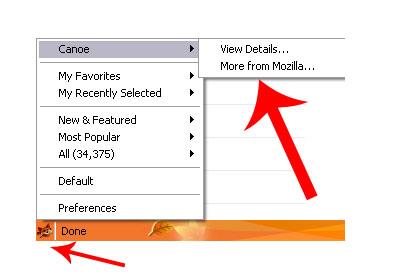
Instead of going to the Personas site to see if a designer you like has released a new Persona, you can now click the Personas icon from the bottom left hand side of the window, and then click More From DESIGNERNAME
Your Favorite Personas
You can easily access all the Personas you’ve flagged as favorites. Again, all you have to do is now click the Personas icon from the bottom left hand side of the window, then go to My Favorites.
Please note that you need to have a Personas account to access this feature.
Personas by Category
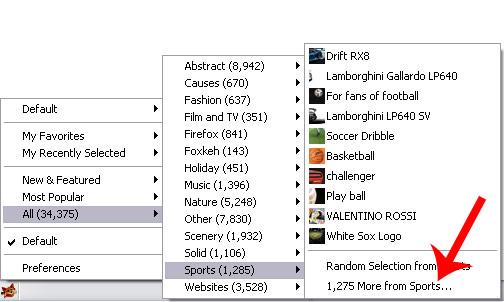
Let’s say you want to turn on a Persona from the Sports category. So click the Personas icon and go to the Sports section. Sadly though, you do not find anything to your tastes in there. Instead of visiting the Personas site, you can now simply click More from Sports link.
Undo Changes
Each time you turn on a Persona you haven’t marked as a favorite or a Persona you haven’t used recently, a notification bar will appear (similar to when Firefox blocks a popup). Click Undo and the Persona will go away; the previous Persona will be reactivated.
If you would like to learn more about Personas, visit the official site here.
If you would like to get the Personas add-on, you can download it straight from Mozilla here.
Please note that the getting the Personas add-on is not required by Firefox 3.6 users as Personas will come built into the browser. At the time of writing this, the most recent Firefox 3.6 release is Firefox 3.6 Beta 2.
Numerous updates for Personas have been released over time; the most recent update is Personas 1.4, which features several enhancements that will let the user easily discover new art, rotate through favorite Personas and undo changes to Personas. Mozilla says it was user feedback that pushed them to implement these enhancements in Personas 1.4, so let’s take a closer look, shall we?
Here is what you can expect to get from Personas 1.4:
More Personas from the same designer
Instead of going to the Personas site to see if a designer you like has released a new Persona, you can now click the Personas icon from the bottom left hand side of the window, and then click More From DESIGNERNAME
Your Favorite Personas
You can easily access all the Personas you’ve flagged as favorites. Again, all you have to do is now click the Personas icon from the bottom left hand side of the window, then go to My Favorites.
Please note that you need to have a Personas account to access this feature.
Personas by Category
Let’s say you want to turn on a Persona from the Sports category. So click the Personas icon and go to the Sports section. Sadly though, you do not find anything to your tastes in there. Instead of visiting the Personas site, you can now simply click More from Sports link.
Undo Changes
Each time you turn on a Persona you haven’t marked as a favorite or a Persona you haven’t used recently, a notification bar will appear (similar to when Firefox blocks a popup). Click Undo and the Persona will go away; the previous Persona will be reactivated.
If you would like to learn more about Personas, visit the official site here.
If you would like to get the Personas add-on, you can download it straight from Mozilla here.
Please note that the getting the Personas add-on is not required by Firefox 3.6 users as Personas will come built into the browser. At the time of writing this, the most recent Firefox 3.6 release is Firefox 3.6 Beta 2.







