Swing Shot: Cute Graphics, Thrilling Battle Action

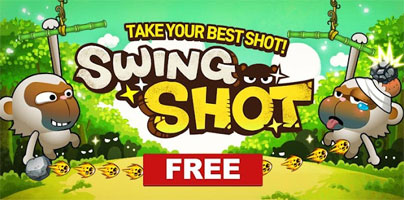
The Swing Shot game for iOS and Android grabs you with its cute graphics and with its thrilling battle action. Take control of the animals and prepare your offense.
The story behind the Com2uS-developed app Swing Shot goes something like this. The animals were sitting in the forest, minding their own businesses, not knowing that an evil witch was about. Then one of them has to go and say “I’m bored”. Hearing this, the witch goes mental and casts a spell on the animals, turning them into evil, red-eyed, stone-flinging savages. It is up to you to take control of the animals that are still sane and battle the evil ones.
There are two ways to play the game: Arcade and Versus Mode. The first level in Arcade Mode explains how to play the game: put your finger on the screen, swipe back, aim, release to fire. You start out with a bunch of monkeys and you use your skills to throw rocks at the enemies in front of you. When you take all of them out, you can move on to the next level. There are 48 levels in all in Arcade Mode, levels that are spread across 4 worlds.
The monkey is the first animal you start with. Collect bananas and you can spend them on getting new animals: the raccoon (cuts a rope), brown bear (attacks with honeybees), sloth (uses bugs), panda (throws a boomerang). You can also spend your bananas on changing the sort of materials the animals hold on to. You can purchase things like plywood, brick, superalloy, and even a gold stick.
Swing Shot’s Versus Mode is divided into three categories: Classic, Sniper, and Crazy. In this game mode you will get to test your skills against other Swing Shot players. When you go through all the levels in Arcade Mode, or when you want to take a break from Arcade Mode, why not try your hand against a human opponent?
Android users: Swing Shot is available for free on Google’s Play Store here.
iOS users: there are two versions on Apple’s App Store. Get the Free version here and the paid Plus version here.
The story behind the Com2uS-developed app Swing Shot goes something like this. The animals were sitting in the forest, minding their own businesses, not knowing that an evil witch was about. Then one of them has to go and say “I’m bored”. Hearing this, the witch goes mental and casts a spell on the animals, turning them into evil, red-eyed, stone-flinging savages. It is up to you to take control of the animals that are still sane and battle the evil ones.
There are two ways to play the game: Arcade and Versus Mode. The first level in Arcade Mode explains how to play the game: put your finger on the screen, swipe back, aim, release to fire. You start out with a bunch of monkeys and you use your skills to throw rocks at the enemies in front of you. When you take all of them out, you can move on to the next level. There are 48 levels in all in Arcade Mode, levels that are spread across 4 worlds.
The monkey is the first animal you start with. Collect bananas and you can spend them on getting new animals: the raccoon (cuts a rope), brown bear (attacks with honeybees), sloth (uses bugs), panda (throws a boomerang). You can also spend your bananas on changing the sort of materials the animals hold on to. You can purchase things like plywood, brick, superalloy, and even a gold stick.
Swing Shot’s Versus Mode is divided into three categories: Classic, Sniper, and Crazy. In this game mode you will get to test your skills against other Swing Shot players. When you go through all the levels in Arcade Mode, or when you want to take a break from Arcade Mode, why not try your hand against a human opponent?
Android users: Swing Shot is available for free on Google’s Play Store here.
iOS users: there are two versions on Apple’s App Store. Get the Free version here and the paid Plus version here.







