See Who Snooped on Your iPhone with this App

The “Who Touched my Phone” app will show you who snooped on your iPhone while you were away. This sort of functionality is very welcomed if you suspect that your spouse, a coworker, a friend, or a family member accesses your iPhone while you’re not there. The app will tell you if your girlfriend is reading your text messages, if your mom is reading your emails, or if Bob looks through your pics while you’re not in the office.
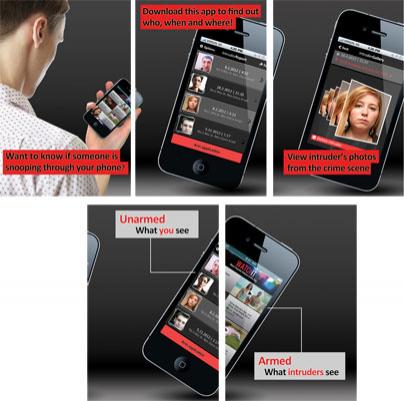
The application features an Armed and an Unarmed Mode. Activate the armed mode, leave your iPhone on your desk, and walk out of the room. If someone picks up your smartphone and starts snooping around, starts reading your emails, viewing your pics and other things of the sort, the application will capture the snooper in action. The application will take pics of whoever is using your iPhone without your consent.
To find out who snooped on your iPhone, you must get out of Armed Mode and go to Unarmed Mode – you can do this by pressing the screen with 2 fingers for 2 seconds. All the images captured by the Who Touched my Phone app will be presented to you when you go to unarmed mode.
With photographic evidence in your possession, you can then confront the person who snooped on your iPhone. Or, if you don’t want to let the snooper know that you’re on to him/her, you can now make sure to not leave any incriminating or sensitive info on your iPhone.
With the Who Touched my Phone app installed on your device you can find out who snoops on you. To prevent the actual snooping, you should get an app that prevents unauthorized access to the device. Why did App & Joy, independent app development studio based out of Tel Aviv that came up with this app, take this approach? Just like Microsoft and its “monitor first” approach, App & Joy believes that the most important thing is to know who’s snooping on you.
“Who Touched my Phone doesn't block any content but captures the snooping event without the intruder's knowledge. Moreover, we believe that you cannot protect all of your phone’s information completely, all of the time. Therefore, we find it more important to secretly capture and inform you whenever there was an attempt to snoop through your phone,” said Tal Shumski, CTO of App & Joy.
Who Touched my Phone is available for purchase in the App Store for 99 cents at the time of writing this.
The application features an Armed and an Unarmed Mode. Activate the armed mode, leave your iPhone on your desk, and walk out of the room. If someone picks up your smartphone and starts snooping around, starts reading your emails, viewing your pics and other things of the sort, the application will capture the snooper in action. The application will take pics of whoever is using your iPhone without your consent.
To find out who snooped on your iPhone, you must get out of Armed Mode and go to Unarmed Mode – you can do this by pressing the screen with 2 fingers for 2 seconds. All the images captured by the Who Touched my Phone app will be presented to you when you go to unarmed mode.
With photographic evidence in your possession, you can then confront the person who snooped on your iPhone. Or, if you don’t want to let the snooper know that you’re on to him/her, you can now make sure to not leave any incriminating or sensitive info on your iPhone.
With the Who Touched my Phone app installed on your device you can find out who snoops on you. To prevent the actual snooping, you should get an app that prevents unauthorized access to the device. Why did App & Joy, independent app development studio based out of Tel Aviv that came up with this app, take this approach? Just like Microsoft and its “monitor first” approach, App & Joy believes that the most important thing is to know who’s snooping on you.
“Who Touched my Phone doesn't block any content but captures the snooping event without the intruder's knowledge. Moreover, we believe that you cannot protect all of your phone’s information completely, all of the time. Therefore, we find it more important to secretly capture and inform you whenever there was an attempt to snoop through your phone,” said Tal Shumski, CTO of App & Joy.
Who Touched my Phone is available for purchase in the App Store for 99 cents at the time of writing this.







