Preview Multimedia Content in Gmail: YouTube, Flickr, Picasa, Yelp

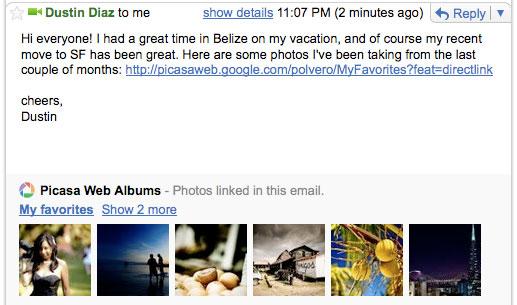
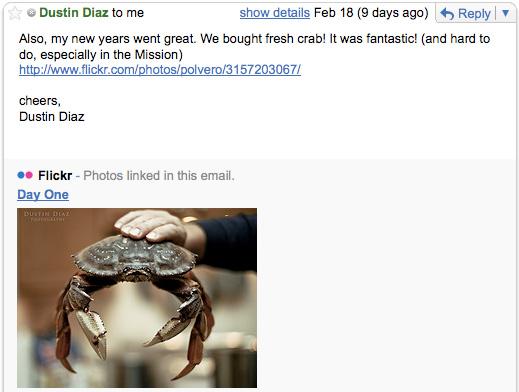
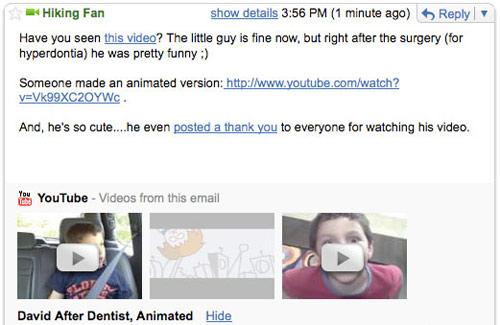
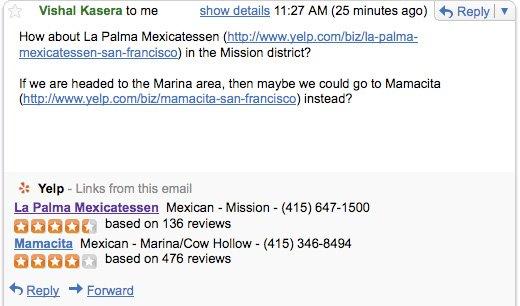
A while back we were reporting that the built-in chat client in Gmail will allow you to preview YouTube videos directly in the chat window; Google Labs is now announcing that similar functionality has been added to Gmail. What this means is that if you get an email message in your inbox, and said email contains a link towards an YouTube video, a Flickr image, a Picasa Web Album or an Yelp review, then Gmail will be able to preview that link for you.
Software Engineer with Google, Vishal Kasera comments: “My email is full of links. The truth is, I'm pretty lazy. That's why I like YouTube previews in Gmail chat -- why open a new tab when I can watch the video my friend sent me right there? Gmail currently automatically detects package tracking information, addresses, and event information and shows quick links to delivery status, maps and directions, and Google Calendar. So why couldn't Gmail automatically detect links in emails and show videos, photos, and ratings right inside these messages as well?”
To enable the new feature(s), follow these simple steps:
Step 1 – Go to Gmail and login to your account. If you do not have one, perhaps this would be the best time to sign up (it’s free and you get tons of features to play with).
Step 2 – In the top right corner of the screen, right next to your user name you should be able to see “Settings”; click it. Now locate “Labs” and click it as well.
Step 3 – Locate the following: YouTube previews in mail, Picasa Previews in mail, Flickr previews in mail, Yelp previews in mail. Select “Enable” for the ones that interest you. Click “Save Changes” (at the bottom of the screen) and you’re done. To see how previews will look like, check out the images at the bottom.
It must be said that this is the second time this week we have good news to report about Gmail. Yesterday the Gmail team announced that it has given the mail client a better way to mark messages as unread (details here).
Software Engineer with Google, Vishal Kasera comments: “My email is full of links. The truth is, I'm pretty lazy. That's why I like YouTube previews in Gmail chat -- why open a new tab when I can watch the video my friend sent me right there? Gmail currently automatically detects package tracking information, addresses, and event information and shows quick links to delivery status, maps and directions, and Google Calendar. So why couldn't Gmail automatically detect links in emails and show videos, photos, and ratings right inside these messages as well?”
To enable the new feature(s), follow these simple steps:
Step 1 – Go to Gmail and login to your account. If you do not have one, perhaps this would be the best time to sign up (it’s free and you get tons of features to play with).
Step 2 – In the top right corner of the screen, right next to your user name you should be able to see “Settings”; click it. Now locate “Labs” and click it as well.
Step 3 – Locate the following: YouTube previews in mail, Picasa Previews in mail, Flickr previews in mail, Yelp previews in mail. Select “Enable” for the ones that interest you. Click “Save Changes” (at the bottom of the screen) and you’re done. To see how previews will look like, check out the images at the bottom.
It must be said that this is the second time this week we have good news to report about Gmail. Yesterday the Gmail team announced that it has given the mail client a better way to mark messages as unread (details here).







