Phoenix Freeze: Bluetooth Proximity Lock Software for Your PC


How many times did you leave your PC for just a moment, only to find someone else messing with it when you came back? Having someone else go through your stuff can be quite annoying, but if you can spare yourself the heartache if you just use the appropriate software application. Something like Phoenix Freeze for example, a software application that connects your mobile phone with your PC via Bluetooth and automatically locks it down when you are not in range.
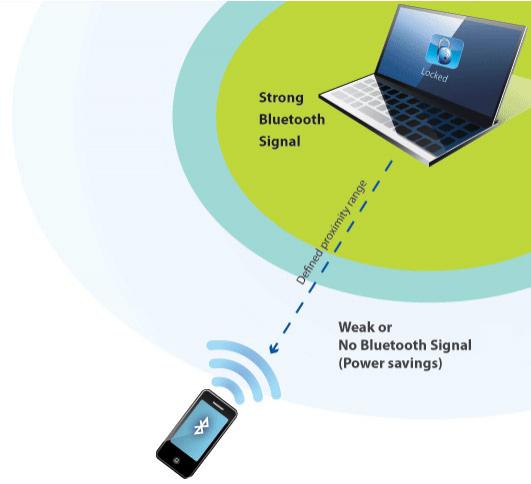
“Freeze pairs your Bluetooth phone with your PC so that your PC is automatically locked when you walk away with your phone. When you return your PC is automatically unlocked. This combination offers safety, security, and peace of mind without the annoying effort required to constantly lock and unlock your PC with passwords or finger swipes. For those who are particularly cautious and for those with a particularly critical need to secure data, you will be able to make Freeze a part of a multifactor authentication process and still reduce the time and effort required to achieve a highly secure PC experience,” explains Phoenix Technologies.
The features and technical bits and pieces you need to know about Phoenix Freeze:
- Intuitive user interface makes it easier for the user to customize the software. The user can, for example, seamlessly set up the security proximity zone and define the power savings settings.
- Phoenix Freeze works straight away since the registration and installation process have been developed with ease-of-use in mind.
- You can control several laptops or desktop systems with the same phone.
- When the phone leaves the security proximity zone, the OS’s password lock is activated. When the phone enters the security proximity zone, the password lock is removed.
- Multifaceted authentification process.
- Built-in intelligence to detect when a Bluetooth device is out of proximity range.
- Power savings mode.
- Works with XP32-bit Professional/Home and Vista 32-bitHome/Ultimate /Business.
Here is what President and CEO of Phoenix Technologies, Woody Hobbs, had to say about Phoenix Freeze: “Security and ease-of-use are the cornerstones of our PC 3.0 strategy of building products and services that deliver new levels of protection as well as performance, simplicity and efficiency, to make mobile PCs as fun and easy to use as mobile phones. Phoenix Freeze raises the bar for mobile PC anti-theft technology, adding an additional layer of security for those who view their data as even more precious than their laptops and want it protected from unwanted exploration in their absence, however brief. Now, with Freeze, locking down access to your laptop is as simple as walking away with your cell phone in your pocket.”
If you would like to get Phoenix Freeze, a download location is available here.
“Freeze pairs your Bluetooth phone with your PC so that your PC is automatically locked when you walk away with your phone. When you return your PC is automatically unlocked. This combination offers safety, security, and peace of mind without the annoying effort required to constantly lock and unlock your PC with passwords or finger swipes. For those who are particularly cautious and for those with a particularly critical need to secure data, you will be able to make Freeze a part of a multifactor authentication process and still reduce the time and effort required to achieve a highly secure PC experience,” explains Phoenix Technologies.
The features and technical bits and pieces you need to know about Phoenix Freeze:
- Intuitive user interface makes it easier for the user to customize the software. The user can, for example, seamlessly set up the security proximity zone and define the power savings settings.
- Phoenix Freeze works straight away since the registration and installation process have been developed with ease-of-use in mind.
- You can control several laptops or desktop systems with the same phone.
- When the phone leaves the security proximity zone, the OS’s password lock is activated. When the phone enters the security proximity zone, the password lock is removed.
- Multifaceted authentification process.
- Built-in intelligence to detect when a Bluetooth device is out of proximity range.
- Power savings mode.
- Works with XP32-bit Professional/Home and Vista 32-bitHome/Ultimate /Business.
Here is what President and CEO of Phoenix Technologies, Woody Hobbs, had to say about Phoenix Freeze: “Security and ease-of-use are the cornerstones of our PC 3.0 strategy of building products and services that deliver new levels of protection as well as performance, simplicity and efficiency, to make mobile PCs as fun and easy to use as mobile phones. Phoenix Freeze raises the bar for mobile PC anti-theft technology, adding an additional layer of security for those who view their data as even more precious than their laptops and want it protected from unwanted exploration in their absence, however brief. Now, with Freeze, locking down access to your laptop is as simple as walking away with your cell phone in your pocket.”
If you would like to get Phoenix Freeze, a download location is available here.







