No Need to Go to the Bank to Cash a Check, the iPhone Does it For You


I am an avid supporter of online banking – I would much rather stay in front of my computer and do all my transactions from the comfort of my own home. But when I am given a check, I can’t just cash it in from my home, I have to go to visit the nearest branch, sit in line, and physically cash that check. A bank called USAA understood that all of this could prove to be a bother for some and decided to do something about it.
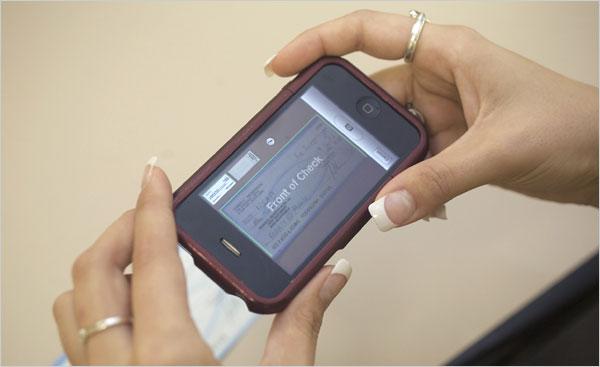
USAA, a privately held bank and insurance company, already has an iPhone app in place (iTunes link here) and this week it will update that app to add functionality that will address all the woes presented above. After the app is updated you can simply use your iPhone to take a picture of the check (front and back side), send the image to the bank and have your account debited automatically. After the money is transferred to your account, you are well advised by USAA to void the check and file or discard it.
Executive Vice President with USAA, Wayne Peacock, comments: “We’re essentially taking an image of the check, and once you hit the send button, that image is going into our deposit-taking system as any other check would. Mobile is going to be a bigger part of how people do commerce and how they interact with their financial institutions. The great value that we see is the time savings.”
Obviously fraud and security are a big concern here. The bank has thought of this before it announced it will add this “snap a shot of your check” functionality. Consequently only certain USAA customers will be able to cash in their checks via the iPhone app – and more specifically, customers that are eligible for credit and insured by the bank. Both requirements must be met, but this doesn’t seem like a problem. According to Wayne Peacock, approximately 60% of USAA’s customers meet these requirements.
USAA, a privately held bank and insurance company, already has an iPhone app in place (iTunes link here) and this week it will update that app to add functionality that will address all the woes presented above. After the app is updated you can simply use your iPhone to take a picture of the check (front and back side), send the image to the bank and have your account debited automatically. After the money is transferred to your account, you are well advised by USAA to void the check and file or discard it.
Executive Vice President with USAA, Wayne Peacock, comments: “We’re essentially taking an image of the check, and once you hit the send button, that image is going into our deposit-taking system as any other check would. Mobile is going to be a bigger part of how people do commerce and how they interact with their financial institutions. The great value that we see is the time savings.”
Obviously fraud and security are a big concern here. The bank has thought of this before it announced it will add this “snap a shot of your check” functionality. Consequently only certain USAA customers will be able to cash in their checks via the iPhone app – and more specifically, customers that are eligible for credit and insured by the bank. Both requirements must be met, but this doesn’t seem like a problem. According to Wayne Peacock, approximately 60% of USAA’s customers meet these requirements.







