Native Support for ISO Image Burning in Windows 7

Burning an ISO image to a physical media device (CD or DVD) is something we’ve grown accustomed to when putting various software applications to the test. The thing is that until now you could only burn that file by using specialized software – something like Nero 9 for example. With the next iteration of the Windows-based operating system, Windows 7, Microsoft plans to do away with such software by natively supporting the burn ISO to CD/DVD option.
Windows Communications Manager, Brandon LeBlanc comments: “We have made it easier to burn ISO images in Windows 7 by natively supporting the ability to burn ISO images directly within Windows without the need of a third party tool. To burn an ISO image in Windows 7, all someone needs to do is simply right-click on an ISO image and choose ‘Burn disc image’.”
Here are the steps you will have to follow in order to burn an ISO file using this built-in functionality that is already available for Windows 7 Beta testers (available in other Windows 7 builds that were leaked online):
- Select an ISO file -> Right click -> Select “Burn disc Image”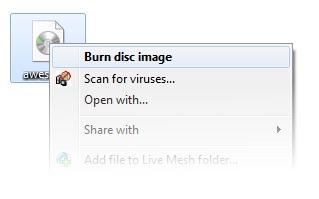
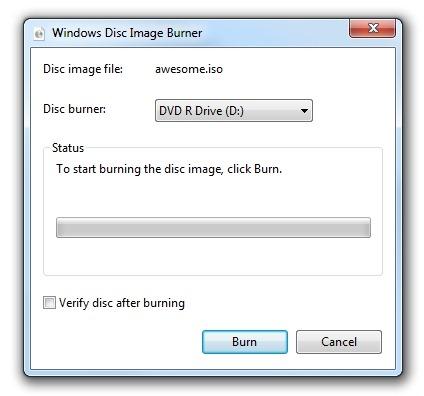
- Windows Disc Image Burner will launch -> Select the physical medium you wish to burn the ISO to (CD or DVD) -> Click “Burn” to start the process.
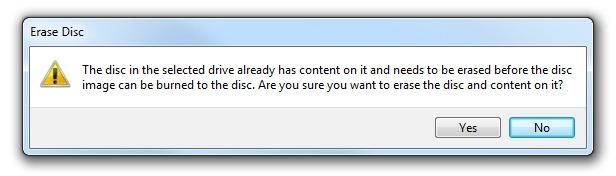
The feature also comes with CD-RW and DVD-RW support; what this means is that when you attempt to burn onto a CD or DVD that has content on it, you will be prompted to erase the existing content before the new data will be burned. This way you will not accidentally lose anything important.
If you already have Windows 7 Beta Build 7000 (the only official Windows 7 Build that Microsoft issued to the general public), then you can give this functionality a try. If you do not have the Beta, you will have to wait until Microsoft releases Windows 7 RC (Release Candidate), or you could get other Windows 7 builds that leaked online and can be downloaded via torrent sites.
Windows Communications Manager, Brandon LeBlanc comments: “We have made it easier to burn ISO images in Windows 7 by natively supporting the ability to burn ISO images directly within Windows without the need of a third party tool. To burn an ISO image in Windows 7, all someone needs to do is simply right-click on an ISO image and choose ‘Burn disc image’.”
Here are the steps you will have to follow in order to burn an ISO file using this built-in functionality that is already available for Windows 7 Beta testers (available in other Windows 7 builds that were leaked online):
- Select an ISO file -> Right click -> Select “Burn disc Image”
- Windows Disc Image Burner will launch -> Select the physical medium you wish to burn the ISO to (CD or DVD) -> Click “Burn” to start the process.
The feature also comes with CD-RW and DVD-RW support; what this means is that when you attempt to burn onto a CD or DVD that has content on it, you will be prompted to erase the existing content before the new data will be burned. This way you will not accidentally lose anything important.
If you already have Windows 7 Beta Build 7000 (the only official Windows 7 Build that Microsoft issued to the general public), then you can give this functionality a try. If you do not have the Beta, you will have to wait until Microsoft releases Windows 7 RC (Release Candidate), or you could get other Windows 7 builds that leaked online and can be downloaded via torrent sites.







