More than 50 Ways to Personalize the New Yahoo! Mail


If you don’t like the way the all new Yahoo! Mail looks by default, you don’t have to put up with it. There are, drum rolls please, more than 50 ways to personalize the new Yahoo! Mail. And when I say there are more than 50 ways to personalize I mean there are more than 50 themes you can use to customize the way Yahoo! Mail looks like. To check out the themes available to you, you need only click Options -> Themes -> select the theme you would like to use.
Here’s a small preview.
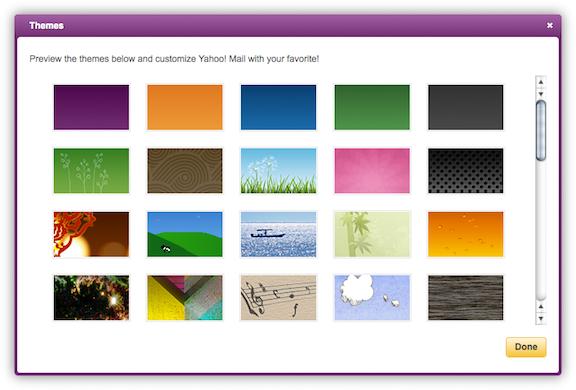
Design Prototyper with Yahoo! Mail, Bryon Engelhardt, and Product Designer with Yahoo! Mail, Paulus Trisnadi, explained that since the launch of the all new Yahoo! Mail, users have been requesting more ways to customize the way Yahoo! Mail looks like. To come up with a greater variety of themes, a bunch of Yahoos around the world pulled together and came up with some great new themes – which means that there are now more than 50 themes to choose from.
“The additions include more colors as well as tons of image-based themes. Whether you’re a nature-lover, star-gazer, art aficionado, or simply a pattern-person, you’ll find something that fits your interest or mood,” said the two.
If you’re not currently using the latest version of Yahoo! Mail, you can upgrade by going here and clicking the “Upgrade Now button”. If you upgrade, you will get to enjoy a faster Yahoo! Mail (two-times faster than previous versions), that can better protect against spam, lets you search within your emails and narrow said search based by sender, attachment file, date, or folder location, prioritizes messages and contacts that matter most, and has some handy social features. Here are the social features I’m talking about:
- You can reply to messages from Facebook, Yahoo! Groups, Yahoo! Mail and other webmail providers by using the new easy reply bar.
- You can view and share updates/notifications from Twitter, Facebook and Zynga from the new Updates tab.
- You can view photo slideshows, inline videos and more from within the inbox.
- You can chat with Facebook friends, Windows Live, and Yahoo! Messenger friends from within the new Yahoo! Mail. You can view past IM and text conversations within Yahoo! Mail.
Here’s a small preview.
Design Prototyper with Yahoo! Mail, Bryon Engelhardt, and Product Designer with Yahoo! Mail, Paulus Trisnadi, explained that since the launch of the all new Yahoo! Mail, users have been requesting more ways to customize the way Yahoo! Mail looks like. To come up with a greater variety of themes, a bunch of Yahoos around the world pulled together and came up with some great new themes – which means that there are now more than 50 themes to choose from.
“The additions include more colors as well as tons of image-based themes. Whether you’re a nature-lover, star-gazer, art aficionado, or simply a pattern-person, you’ll find something that fits your interest or mood,” said the two.
If you’re not currently using the latest version of Yahoo! Mail, you can upgrade by going here and clicking the “Upgrade Now button”. If you upgrade, you will get to enjoy a faster Yahoo! Mail (two-times faster than previous versions), that can better protect against spam, lets you search within your emails and narrow said search based by sender, attachment file, date, or folder location, prioritizes messages and contacts that matter most, and has some handy social features. Here are the social features I’m talking about:
- You can reply to messages from Facebook, Yahoo! Groups, Yahoo! Mail and other webmail providers by using the new easy reply bar.
- You can view and share updates/notifications from Twitter, Facebook and Zynga from the new Updates tab.
- You can view photo slideshows, inline videos and more from within the inbox.
- You can chat with Facebook friends, Windows Live, and Yahoo! Messenger friends from within the new Yahoo! Mail. You can view past IM and text conversations within Yahoo! Mail.







