Microsoft Celebrates Chinese New Year with Year of the Dragon Theme

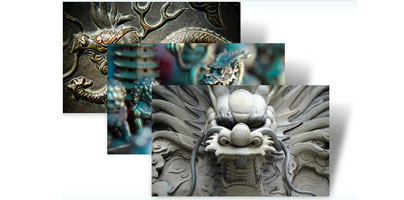
January 23rd marks the Chinese New Year and the start of the Year of the Dragon. According to the Chinese zodiac 2012 is the year of the Water Dragon (water represents intelligence and wisdom, flexibility, softness and pliancy, says Chinese Taoist thought). To celebrate and mark the Chinese New Year, Redmond-based software giant Microsoft has released a new theme for the Windows 7 operating system, theme appropriately entitled “Year of the Dragon.”
The theme is a collection of 12 images that present the imperial dragon rendered in stone, wood, and bronze. It is a very nice collection of ancient and modern images of the imperial dragon. If you’re going to celebrate the Chinese New Year on the 23rd of January, it may be worth your time to get the Year of the Dragon theme and use it to decorate your Windows 7-powered computer.
“Happy New Year! Whether you celebrated it on January 1st (with fireworks!) or plan to do so on January 14th or January 23rd or another date, I wish you a wonderful 2012. It’s interesting that most of the world marks the turn of the year around this time. January 23rd brings the start of the Year of the Dragon, for which we’ve assembled a collection of magnificent ancient and modern renderings in stone, wood, and bronze,” said Jennifer Shepherd, site manager for the Windows Personalization Gallery.
The Windows Personalization Gallery is home to more than a hundred Windows 7 themes, more than eighty desktop wallpapers, and many desktop gadgets. All of them are offered free of charge to Windows users. The themes work with Windows 7 Home Premium, Windows 7 Professional, Windows 7 Enterprise, and Windows 7 Ultimate. To access the Personalization Gallery just click here.
Getting back to the topic at hand, you can get the Year of the Dragon theme for Windows 7 from the abovementioned Personalization Gallery here. Check out the preview below, click it to start downloading the Year of the Dragon theme.
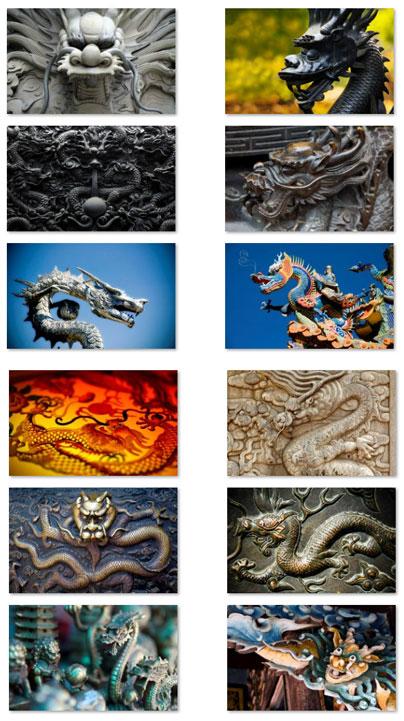
The theme is a collection of 12 images that present the imperial dragon rendered in stone, wood, and bronze. It is a very nice collection of ancient and modern images of the imperial dragon. If you’re going to celebrate the Chinese New Year on the 23rd of January, it may be worth your time to get the Year of the Dragon theme and use it to decorate your Windows 7-powered computer.
“Happy New Year! Whether you celebrated it on January 1st (with fireworks!) or plan to do so on January 14th or January 23rd or another date, I wish you a wonderful 2012. It’s interesting that most of the world marks the turn of the year around this time. January 23rd brings the start of the Year of the Dragon, for which we’ve assembled a collection of magnificent ancient and modern renderings in stone, wood, and bronze,” said Jennifer Shepherd, site manager for the Windows Personalization Gallery.
The Windows Personalization Gallery is home to more than a hundred Windows 7 themes, more than eighty desktop wallpapers, and many desktop gadgets. All of them are offered free of charge to Windows users. The themes work with Windows 7 Home Premium, Windows 7 Professional, Windows 7 Enterprise, and Windows 7 Ultimate. To access the Personalization Gallery just click here.
Getting back to the topic at hand, you can get the Year of the Dragon theme for Windows 7 from the abovementioned Personalization Gallery here. Check out the preview below, click it to start downloading the Year of the Dragon theme.







