Google Calendar Goes Offline, Just like Gmail


It seems that the Mountain View search engine giant is putting its development team at work on making as many of its services available offline. Google Calendar is the latest online service to be fitted with offline capabilities – what this means is that you can view events in the calendar, even though you have a lousy internet connection, or no connection at all. You will not be able to edit them, but still, it’s better than printing out your calendar in anticipation of a trip with no internet access.
Offline Google Calendar is not exactly a new feature; people that have been using Google Apps (the paid version of Google services), have had access to it for some time now. Google is simply taking a good feature and making it available for every user out there that wants to get it.
Senior Product Manager, Ken Norton explains: “In addition to offline access to Gmail while you're traveling or without a strong internet connection, you can now see your Google Calendar events when you're disconnected. This feature has been available to businesses and schools using Google Apps for about a month; we're now turning it on for everyone. Like Gmail, the offline feature of Calendar uses Gears, an open source browser extension that adds offline functionality directly to the browser.”
Follow this simple step by step guide if you would like to turn Offline Google Calendar on:
- Access your Google Calendar account here. If you already have a Google account and are signed in, the link will automatically access your Calendar; if you do not have an account or you are not signed in, you will be directed to the welcome page where you can either provide your credentials and sign in, or use this occasion to set up an account.
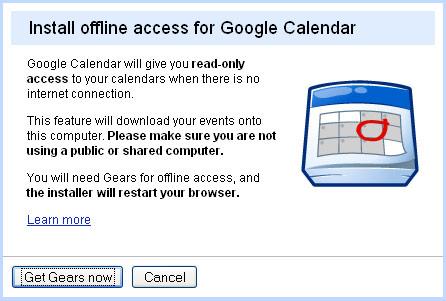
- In the upper right corner of the screen you will notice “Offline Beta”. It is not hard to spot as it is placed right next to your user name. Clicking on “Offline Beta” will launch the installation of Google Gears, which in turn will give your Calendars account offline capability.
Offline Google Calendar is not exactly a new feature; people that have been using Google Apps (the paid version of Google services), have had access to it for some time now. Google is simply taking a good feature and making it available for every user out there that wants to get it.
Senior Product Manager, Ken Norton explains: “In addition to offline access to Gmail while you're traveling or without a strong internet connection, you can now see your Google Calendar events when you're disconnected. This feature has been available to businesses and schools using Google Apps for about a month; we're now turning it on for everyone. Like Gmail, the offline feature of Calendar uses Gears, an open source browser extension that adds offline functionality directly to the browser.”
Follow this simple step by step guide if you would like to turn Offline Google Calendar on:
- Access your Google Calendar account here. If you already have a Google account and are signed in, the link will automatically access your Calendar; if you do not have an account or you are not signed in, you will be directed to the welcome page where you can either provide your credentials and sign in, or use this occasion to set up an account.
- In the upper right corner of the screen you will notice “Offline Beta”. It is not hard to spot as it is placed right next to your user name. Clicking on “Offline Beta” will launch the installation of Google Gears, which in turn will give your Calendars account offline capability.







