Drinkify Matches Your Favorite Music to a Nice Drink

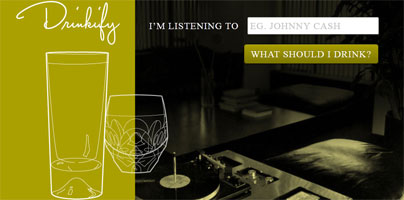
After a hard day at the office it’s quite nice to relax in a comfortable chair and listen to your favorite band. What’s even nicer is to have a drink in your hand and enjoy it while the music blasts in the background. But what should you drink? Should you have some scotch, should you have a beer? The internet app Drinkify tells you what to drink based on what you’re listening to.
Drinkify asks a simple question: What are you listening to? And it provides an answer to another simple question: What should I drink? Type in the name of the artist or band you’re listening to in the text box next to “I’m listening to”. Then click the big button that says “What should I drink?” But a moment later Drinkify will present you with a drink (the name of the drink is always the same as the artist’s or band’s name).
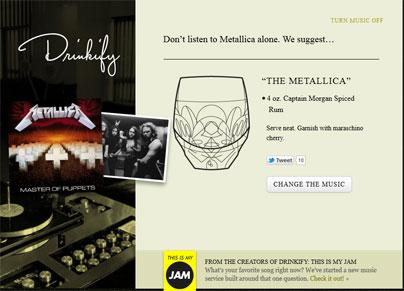
Say you want to listen to some Metallica tracks. Type in the band’s name and Drinkify will tell you to “don’t listen to Metallica alone” and it will suggest you try “The Metallica.” That’s 4 oz. Captain Morgan Spiced Rum served neat and garnished with maraschino cherry.
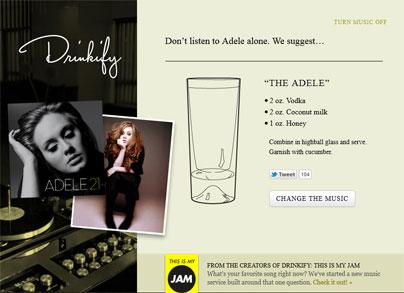
Not a Metallica fan? You would much rather listen to some Adele, you say. Then click the “Change Music” button and type in “Adele” – you will be presented with “The Adelle”, a drink that’s made up of the following: 2 oz vodka, 2 oz coconut milk, and 1 oz honey. Combine the ingredients in a highball glass and garnish with cucumber.
One question comes to mind: where do these suggestions come from? What Drinkify does is it takes your input and uses info from Last.fm, the Echo Nest, and a proprietary drink database to present you with drink suggestions – a drink that goes vey well with the type of music you’re listening to.
To get started with Drinkify just click here.
Drinkify asks a simple question: What are you listening to? And it provides an answer to another simple question: What should I drink? Type in the name of the artist or band you’re listening to in the text box next to “I’m listening to”. Then click the big button that says “What should I drink?” But a moment later Drinkify will present you with a drink (the name of the drink is always the same as the artist’s or band’s name).
Say you want to listen to some Metallica tracks. Type in the band’s name and Drinkify will tell you to “don’t listen to Metallica alone” and it will suggest you try “The Metallica.” That’s 4 oz. Captain Morgan Spiced Rum served neat and garnished with maraschino cherry.
Not a Metallica fan? You would much rather listen to some Adele, you say. Then click the “Change Music” button and type in “Adele” – you will be presented with “The Adelle”, a drink that’s made up of the following: 2 oz vodka, 2 oz coconut milk, and 1 oz honey. Combine the ingredients in a highball glass and garnish with cucumber.
One question comes to mind: where do these suggestions come from? What Drinkify does is it takes your input and uses info from Last.fm, the Echo Nest, and a proprietary drink database to present you with drink suggestions – a drink that goes vey well with the type of music you’re listening to.
To get started with Drinkify just click here.







