Custom Signature Gets Rid of Gmail Ads

The great thing about Google’s email client Gmail is that it comes free of charge, it provides plenty of storage space for your emails, you can select a theme and customize the email client, it will automatically unsubscribe you from newsletters, will delete your unused account only after 6 months have passed, and the list could go on an on. The annoying part is that on the right hand side of the screen, right next to your message, Gmail displays ads.
Joe McKay has uncovered a sneaky, but effective means of forcing Gmail to no longer display any ads: a custom signature that mentions a catastrophic event or tragedy. Google scans your email message for certain keywords and displays ads according to those keywords – but not when you mentioned something truly horrific. In this case Google choosesto remove these ads altogether.
“By offering Gmail users relevant ads and information related to the content of their messages, we aim to offer users a better webmail experience. To ensure a quality user experience for all Gmail users, we avoid showing ads reflecting sensitive or inappropriate content by only showing ads that have been classified as "Family-Safe." Gmail's filters also block ads from running next to messages about catastrophic events or tragedies, erring on the side of not displaying an ad if the content is questionable,” explained Google.
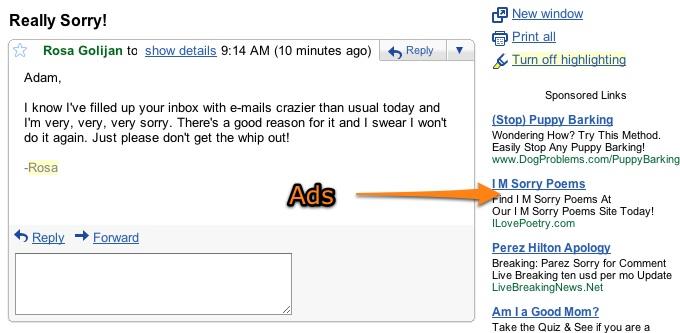
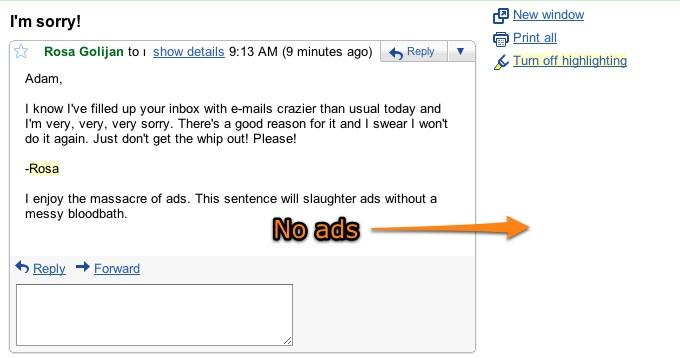
The bottom line is this: use a custom signature that mentions something gory, and ads will not be displayed in Gmail. Lifehacker provided just such an example that I personally find terribly amusing given the circumstances: “I enjoy the massacre of ads. This sentence will slaughter ads without a messy bloodbath.” You could of course use something more gruesome, but this one is efficient enough to get rid of the ads and friendly enough so that it can be used for emails you send to your mom for example – or your boss. See the images below, courtesy of Lifehacker’s Rosa Golijan.
Joe McKay has uncovered a sneaky, but effective means of forcing Gmail to no longer display any ads: a custom signature that mentions a catastrophic event or tragedy. Google scans your email message for certain keywords and displays ads according to those keywords – but not when you mentioned something truly horrific. In this case Google choosesto remove these ads altogether.
“By offering Gmail users relevant ads and information related to the content of their messages, we aim to offer users a better webmail experience. To ensure a quality user experience for all Gmail users, we avoid showing ads reflecting sensitive or inappropriate content by only showing ads that have been classified as "Family-Safe." Gmail's filters also block ads from running next to messages about catastrophic events or tragedies, erring on the side of not displaying an ad if the content is questionable,” explained Google.
The bottom line is this: use a custom signature that mentions something gory, and ads will not be displayed in Gmail. Lifehacker provided just such an example that I personally find terribly amusing given the circumstances: “I enjoy the massacre of ads. This sentence will slaughter ads without a messy bloodbath.” You could of course use something more gruesome, but this one is efficient enough to get rid of the ads and friendly enough so that it can be used for emails you send to your mom for example – or your boss. See the images below, courtesy of Lifehacker’s Rosa Golijan.







