Chrome 15 Beta Features a New Tab Page


Mountain View-based search engine giant is serving Chrome 15.0 to Windows, Mac and Linux users on the Beta channel. Now Betas are fidgety and tend to have problems, so unless you a hardcore fan or a tester, it’s best to stay away from them. But there is one thing that may push you to give Chrome 15.0 Beta a try: the fact that it comes with a brand new tab page.
As Google explained, it changed the Tab Page with a simple goal in mind: to simplify the visual appearance and provide the user with a simple way to manage all his apps, bookmarks, and the sites he visits most often. Chrome is a speedy browser and the user should be speedy as well – he should be able to easily and rapidly manage his stuff and get to where he wants to go.
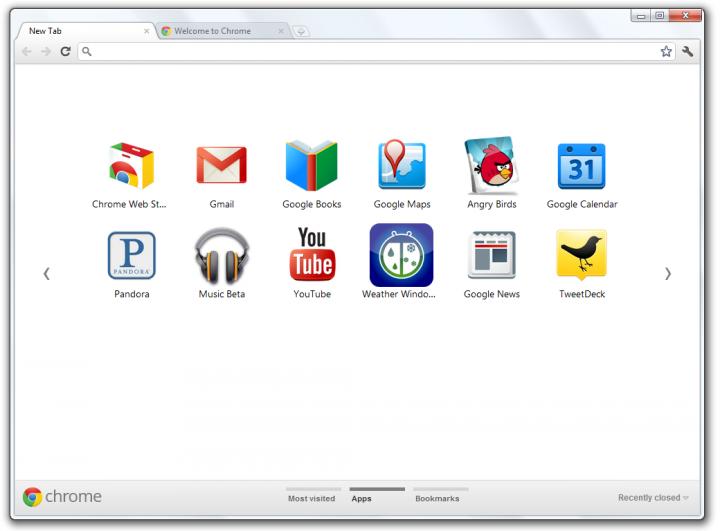
The information the new tab page displays is grouped in three different section. There’s a section for apps, a section for bookmarks, and last but not least, a section for the user’s most visited sites. Switching from one section to another is a very simple process – the user needs only click the section labels at the bottom of the page or click the arrows displayed on the sides.
If the user is on the apps section when he closes Chrome, the next time he launches the browser, it will remember that the user was on the apps section. And speaking about the apps section, if the user wants to rearrange the apps in the section, he can do that by dragging and dropping the apps as he sees fit. If the user takes and app and drags it to the bottom of the page, he can create a new apps section. This new section can be named as the user wants; to do that the user must double click the label. If the user takes and app and drags it to the bottom right corner, a trash can will appear; the user can thus remove items from any section.
Here’s an image of the new tab page available in Chrome 15.0 Beta.
If you would like to get Chrome 15.0 Beta, you need to get on the Beta channel here.
As Google explained, it changed the Tab Page with a simple goal in mind: to simplify the visual appearance and provide the user with a simple way to manage all his apps, bookmarks, and the sites he visits most often. Chrome is a speedy browser and the user should be speedy as well – he should be able to easily and rapidly manage his stuff and get to where he wants to go.
The information the new tab page displays is grouped in three different section. There’s a section for apps, a section for bookmarks, and last but not least, a section for the user’s most visited sites. Switching from one section to another is a very simple process – the user needs only click the section labels at the bottom of the page or click the arrows displayed on the sides.
If the user is on the apps section when he closes Chrome, the next time he launches the browser, it will remember that the user was on the apps section. And speaking about the apps section, if the user wants to rearrange the apps in the section, he can do that by dragging and dropping the apps as he sees fit. If the user takes and app and drags it to the bottom of the page, he can create a new apps section. This new section can be named as the user wants; to do that the user must double click the label. If the user takes and app and drags it to the bottom right corner, a trash can will appear; the user can thus remove items from any section.
Here’s an image of the new tab page available in Chrome 15.0 Beta.
If you would like to get Chrome 15.0 Beta, you need to get on the Beta channel here.







